Tuesday, 14 August 2012

Week 3 - 5 Reference Images

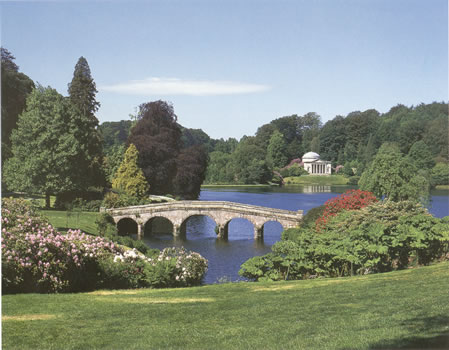
Capability Brown
http://www.en.utexas.edu/Classes/Moore/neoclassical/images/gardens/small/STOURHEAD-232A.jpg

“Landscape with the arrival of Aeneas at Pallanteum" - Claude Lorrain
http://www.oceansbridge.com/paintings/artists/recently-added/july2008/big/Landscape-with-the-arrival-of-Aeneas-at-Pallanteum-xx-Claude-Lorrain.JPG


"Rocky bay with figures" - J M W TURNER |
http://nga.gov.au/exhibition/turnertomonet/Images/LRG/171877.jpg


"Water at Wentworth, Yorkshire" - Humphry Repton
http://upload.wikimedia.org/wikipedia/commons/thumb/5/53/Humphry_Repton01.jpg/640px-Humphry_Repton01.jpg


Humble Administrator Garden, Suzhou
http://topworldtourism.com/wp-content/uploads/2012/01/humble-administrator-garden-suzhou-pic-5.jpg


Tuesday, 31 July 2012

Week 2 - Geocontrol2

Letter: E
Number: 0 (zero)

Using Geocontrol2 for the first time and I love how this program works in creating terrain with ease.
It took trial and error process to get to the desired landforms for my island. I've included the graph for those who wish to have similar qualities land formation.

E, 0 Landscape

E, 0 Landscape - Added Colours
E,0 Landscape - Texture


Week 2 - Landscapes

5 Inspirational Landscapes Photos

“La Tremola” (San Gotthard )

Rice Fields

New Zealand Landscape

Andes Mountains, Chile

Zabriskie Point in Death Valley National Park


Images References:

“La Tremola” (San Gotthard )
http://i875.photobucket.com/albums/ab318/pauls391/global%20bike%20tours/P1020063.jpg

Rice Fields
http://www.zastavki.com/pictures/1024x768/2009/Nature_Fields_rice_Fields_017572_.jpg

New Zealand Landscape
http://st.gdefon.ru/wallpapers_original/wallpapers/30783_gory_ozero_zelen_novaya-zelandiya_1920x1200_%28www.GdeFon.ru%29.jpg

Andes Mountains, Chile
https://blogger.googleusercontent.com/img/b/R29vZ2xl/AVvXsEi0vAK6EBGmNJp50ANO8iiNsKmP_l6JBPfvYKNOkBnRt6kL4A1YeTkAwatgstH6uonWQ_fDE4tZFYWewGyGs6UpeyJq5D-TzD6IbCJTTUk96BL-lBmYBeZduFQDAPre5WRcY2XMPGU_CEY/s1600/Andes_Mountains_Chile.jpg

Zabriskie Point in Death Valley National Park
http://images.nationalgeographic.com/wpf/media-live/photos/000/020/cache/death-valley-zabriskiepoint_2015_600x450.jpg

User Interface Panels – Overview

Identifies 5 shortcuts or buttons


1. Shift + Space bar: Turns helpers on and off.

2. Ctrl  + C: Clone selected object.

3.  Ctrl + Shift + S: Save an object(s) to the game folder.

4.  Ctrl  +  F: Unfreezes all frozen objects Ctrl  +  H: Unhides all hidden objects

5. DB Button = opens up data base view

6. Number 1 = Select and Move, Number 2 = Rotate, Number 3 = Scale, Number 4 = Select Terrain

Viewports

3 Different ways of moving around your level

1. Keys to move around the viewport
       
    W = Forward
    A  = Left
    S  = Backward
    D  = Right
 
Press shift to move faster
Right click the mouse button to look around
Click middle mouse button to pan around
Scroll wheel mouse to zoom in/out
2. Press "Q" to turn on/off the option to go through objects

3. Go To Position - gives you the exact coordinates of your position and allows you to copy and paste it to be able to go back to it.

Customising The Editor

5 ways you might customize your Sandbox editor setup

1)Click and Drag the windows on top of each other and organise them into one window or separate to desired position .
2)Windows can allocated anywhere the user want to be located.
3)Tools bars can be turn on/off.
4)Go to "Tools" - "Customise Keyboard" to customise your own toolbars and commands.
5)Turn on "enable back up" to save file automatically.